Stellar Typography: Crafting with the Skeleton Color Font
A Constellation of Creativity
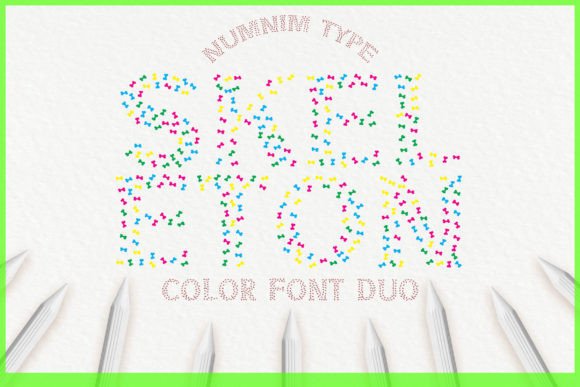
In the world of design, finding a typeface that genuinely breaks the mold is rare. We often cycle through the same geometric sans serifs or elegant serifs, looking for something that adds a spark without cluttering the layout. Enter Skeleton. This isn't just another font; it is a visual experience. At its core, Skeleton is a premium font constructed entirely out of tiny, intricate stars. It captures the essence of a display font while maintaining a playful, celestial aesthetic that feels both magical and structured.
The "personality" of Skeleton is undeniably whimsical, yet it retains a level of sophistication because of the uniformity of the star shapes. It avoids looking messy or chaotic, which is a common pitfall with novelty typefaces. Instead, it offers a texture that draws the eye immediately. For brand identity projects that aim to be memorable, Skeleton provides an instant "wow" factor. It speaks to themes of wonder, night skies, imagination, and celebration. Whether you are a content creator looking to spice up thumbnails or a graphic designer working on packaging design, the visual weight of this creative font is substantial.
Technical Reality: Understanding Opentype-SVG
Before diving into applications, it is crucial to understand the technology behind Skeleton. This is a color font, specifically an Opentype-SVG font. Unlike traditional vector fonts that rely on single-color fills, SVG fonts embed actual images or textures within the font file. This is how Skeleton achieves its detailed star-filled look.
However, this advanced technology comes with specific compatibility requirements that every marketer and entrepreneur needs to know. Skeleton is fully compatible with professional design software like PhotoShop, Illustrator, Silhouette, and Inkscape. This makes it a robust asset for digital design work. However, it is important to note that the OTF and TTF files included are not compatible with Cricut machines. If you are a crafter or hobbyist using a Cricut for physical goods, you will need to rasterize the text in a compatible program first or use it strictly for digital projects. Always check the Ultimate Font Guide provided to ensure your specific workflow supports SVG technology.
Strategic Applications for Modern Brands
How do you actually use a font like Skeleton in a professional context? The key is to treat it as a focal point. Because Skeleton is so visually distinct, it works best as a headline or title font rather than body copy. Imagine using it for the masthead of a digital magazine or the title card of a YouTube video. It instantly sets a tone of high-energy creativity.
- Stationery and Invitations: For small business owners in the event planning space, Skeleton is perfect for headers on party invitations, wedding save-the-dates, or holiday cards. The star motif naturally fits celebratory themes.
- Merchandise and Apparel: If you are designing t-shirts or tote bags, a phrase set in Skeleton creates a graphic element that functions almost like an illustration. It adds value to the product without needing additional clipart.
- Social Media Graphics: On platforms like Instagram or TikTok, stopping the scroll is everything. Skeleton creates bold, textured text overlays that stand out against busy backgrounds or video footage.
For logo design, caution is advised. While Skeleton is fantastic for event logos or temporary campaign branding, its intricate detail might reduce legibility at very small sizes, such as a website favicon. However, for a blog header or a poster, it is an unbeatable choice for grabbing attention.
Mastering Font Pairings and Hierarchy
One of the most common mistakes with modern typography is using two competing fonts. Since Skeleton is a highly decorative display font, it demands a partner that sits back and lets it shine. You should avoid pairing it with a script font or another complex handwritten font, as this will create visual noise that tires the reader.
Instead, look toward clean, neutral typefaces. A geometric sans serif font is often the best companion. The clean lines of a sans serif provide a resting place for the eyes, creating a balanced visual hierarchy. For example, if you are creating a brochure, use Skeleton for the main headline to convey energy and creativity, then switch to a legible sans serif for the subheadings and body text. This approach ensures your message is communicated clearly while maintaining the artistic flair of the Skeleton typeface.
Another effective strategy is pairing Skeleton with a classic serif font. This creates an interesting contrast between the playful, modern texture of the stars and the traditional, authoritative look of serif typography. This works particularly well in editorial design, such as magazine covers or book chapter headings, where you want to blend whimsy with substance.
Evaluating Fit and Commercial Use
As a design asset, Skeleton offers significant value, but context is king. Before incorporating it into a commercial font project, consider your audience. If your target demographic is corporate finance, the playful star texture might undermine your credibility. However, if you are targeting parents, party planners, creatives, or the entertainment industry, Skeleton aligns perfectly with audience expectations for fun and engagement.
When testing the font, pay attention to readability. While the star shapes are distinct, long sentences can become visually "noisy." It is best used for short bursts of text—headlines, logos, or single words. If you are working on web design, ensure that you have a fallback font specified in your CSS, just in case the user's browser doesn't render the SVG color data (though modern browsers are increasingly good at this).
Ultimately, Skeleton is more than just a typeface; it is a design statement. It bridges the gap between typography and illustration, offering designers and publishers