Gummy: The Color Font That Makes Designs Pop
There’s a particular kind of design project that calls for more than just a typeface—it calls for personality. When you’re crafting a birthday invitation for a child, designing social media graphics for a bakery, or creating labels for a line of handmade bath bombs, a standard serif font or even a clean sans serif font can feel too corporate, too sterile. This is where a creative font like Gummy steps in, offering a vibrant, tactile quality that standard typography simply can’t match. Gummy isn’t just a set of letters; it’s a color font designed to inject a soft, cute, bright, and fun feel directly into your work.
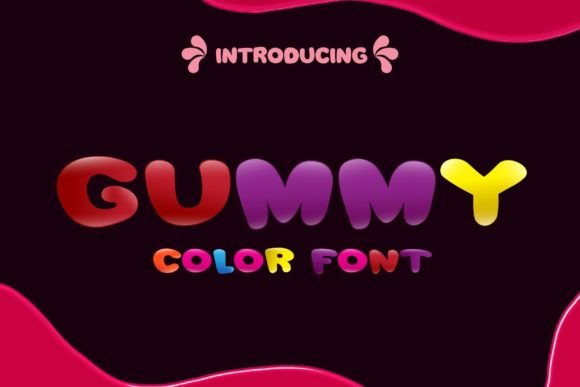
As a premium font, Gummy falls into the category of display typography, but with a modern twist. It’s an Opentype-SVG file, which means the color and texture are embedded directly into the font file itself. When you type with Gummy, you’re not applying a gradient or a texture effect after the fact; the soft, glossy, candy-like appearance is inherent to every letter. This makes it an incredibly efficient design asset for creators who want that polished, professional look without spending hours on manual effects. The visual style is playful and approachable, making it perfect for projects that need to communicate joy, sweetness, and authenticity.
Where Gummy Truly Shines: Practical Applications
Understanding where a display font like Gummy fits best is key to using it effectively. Its bold, colorful nature means it’s designed for headlines, logos, and focal points—not for long paragraphs of body text. Think of it as the exclamation point in your design vocabulary. For entrepreneurs and small business owners in the food, beauty, or children’s product industries, Gummy can become a cornerstone of your brand identity. Imagine it on the header of a website for a cupcake shop, or as the main text on a product tag for a handmade toy store. It immediately sets a tone of fun and quality.
For content creators and marketers, Gummy is a powerful tool for social media graphics. In a fast-scrolling feed, a post set in a vibrant color font stops the thumb. It’s perfect for announcements, sale graphics, quotes, and story highlights. Because it’s a creative font with built-in color, it reduces the need for complex layering in apps like Canva or Photoshop, streamlining your workflow. Bloggers and publishers can use it for chapter titles in e-books, magazine cover lines, or header images that need to pop. It’s also a fantastic choice for packaging design, especially for products aimed at a younger or more playful demographic.
Integrating Gummy into Your Design Toolkit
Choosing a premium font is an investment, so it’s important to evaluate how it will work within your existing projects and software. Gummy is delivered as an OTF file, which is the standard for advanced typographic features. It’s crucial to note its compatibility: it works seamlessly in professional design software like Adobe Photoshop, Illustrator, and Inkscape, as well as with cutting machines like Silhouette. However, it is not compatible with Cricut machines. This is a technical detail that crafters and hobbyists must check before purchasing to ensure it fits their production process.
When incorporating Gummy into a project, font pairing is essential. Because Gummy is so visually strong, it needs a quieter partner to create balance and ensure readability. Pair it with a simple, clean sans serif font for body text or supporting information. A geometric sans serif with plenty of white space will complement Gummy’s rounded, soft forms without competing for attention. Avoid pairing it with other ornate script fonts or handwritten fonts, as this can create visual clutter and undermine the professional polish you’re aiming for.
Testing and Finalizing Your Design
Before committing Gummy to a large print run or a major brand launch, test it in context. Create a mockup of your intended use—whether it’s a greeting card, a website header, or a logo design. View it at the actual size it will be displayed or printed. Check the visual hierarchy: does Gummy naturally draw the eye to the most important message? Assess the readability of the color font against your chosen background. While it’s designed to be legible, a busy background might require you to add a subtle drop shadow or a solid shape behind the text to maintain clarity.
Finally, review the commercial licensing that comes with the font. Most premium fonts like Gummy are licensed for both personal and commercial use, but the specifics can vary. Ensure your intended use—whether for client work, merchandise for sale, or digital products—falls within the license terms. By understanding these practical considerations, you can confidently add Gummy to your toolkit, knowing it will help you create designs that are not only beautiful but also strategically sound and professionally executed.